Hidden Album vs Photo Vault App: Which Protects iPhone Photos?
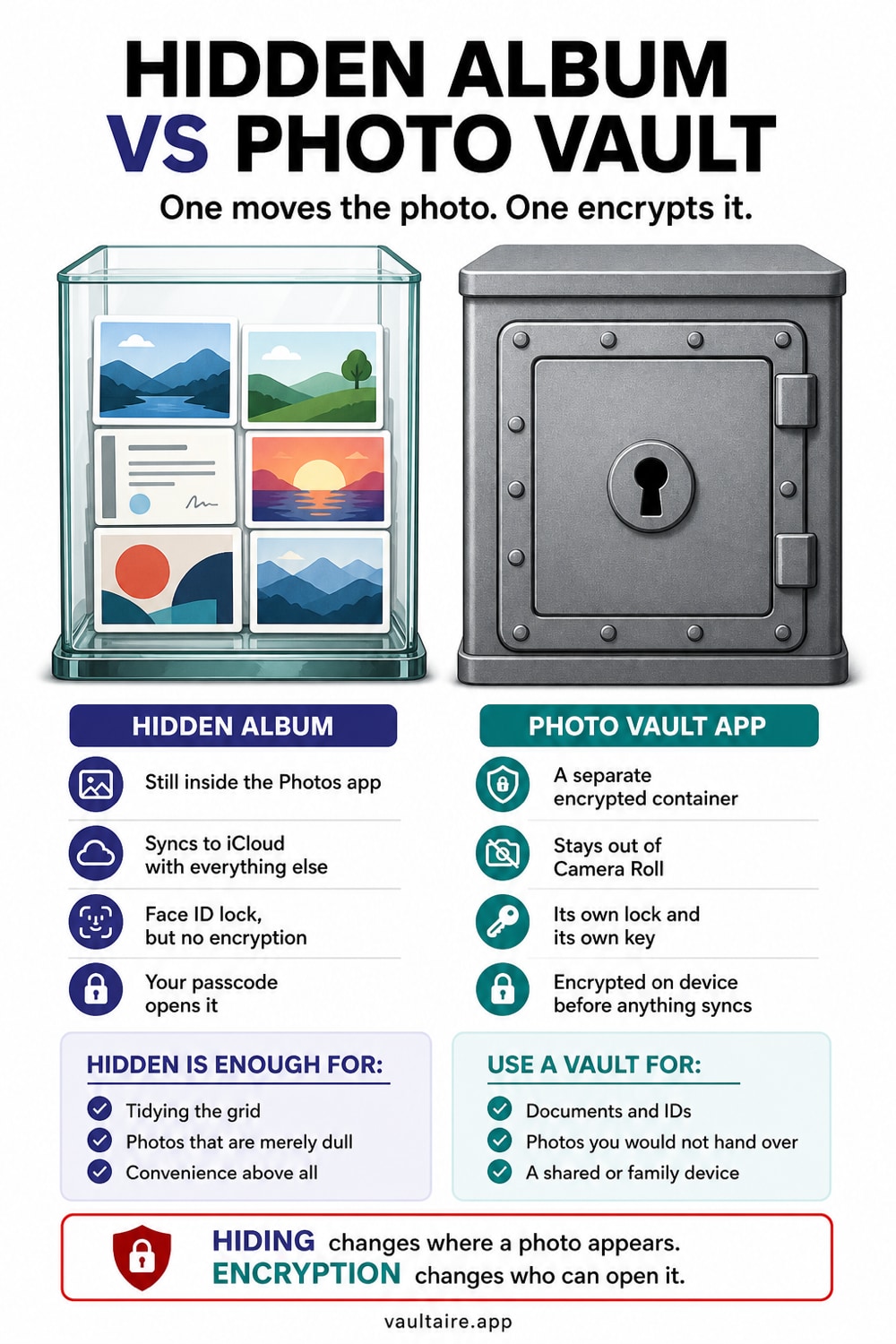
The Hidden album and a photo vault app sound like they do the same job, but they protect your photos in very different ways. One simply tidies images out of your main grid while leaving them on Apple's servers. The other encrypts them on the device behind a separate key. Here is the honest comparison so you can pick the right tool for each kind of photo.
The Hidden album only moves photos out of your main grid, and they still sync to iCloud and appear at iCloud.com when iCloud Photos is on. A photo vault app encrypts images on the device behind its own key and keeps them out of your library and iCloud Photos. Use the Hidden album for casual clutter, and a vault app for anything genuinely private.
The Quick Verdict
If you only need to keep a few photos out of sight while you scroll, the Hidden album is fine. It moves images out of your main timeline so they do not surface in Memories or when you hand someone your phone to look at a single picture. Since iOS 16 it can also be locked behind Face ID, which stops a casual snooper from tapping straight into it. For low stakes clutter, that is genuinely all you need.
If the photos are something you would never want a stranger, an ex, or Apple itself to see, the Hidden album is not enough, and a photo vault app is the better choice. A vault encrypts the files on the device, keeps them out of iCloud Photos, uploads only an encrypted backup that you can turn off, and locks them behind a key that is separate from your phone passcode. The rest of this guide explains exactly why those two tools sit so far apart.
How The Hidden Album Works
Hiding a photo is a sorting action, not a security action. It moves the image out of your main grid and into the Hidden album under Albums and Utilities, so it stops appearing in Memories, Years, and the main timeline. The pixels, the underlying file, and the location metadata all stay exactly the same. Nothing about hiding a photo encrypts it or removes it from the copy that iCloud keeps for you.
That last point is the one most people miss. When iCloud Photos is on, the Hidden album syncs to Apple's servers like every other album, shows up on every device signed into your Apple ID, and can be opened at iCloud.com in any browser. The Face ID lock added in iOS 16 only guards the view on that one device. Anyone who knows your Apple ID password can sign in on a computer and browse the Hidden album with no Face ID prompt at all.
What A Photo Vault App Adds
A photo vault app can encrypt stored image contents rather than merely move them. It also keeps imported copies out of the system photo library, so they do not appear through iCloud Photos or at iCloud.com as Photos items. That does not automatically exclude the app container from a separate iOS or computer device backup; backup behavior must be checked independently.
The next boundary is key custody. A separate app credential can prevent the iPhone passcode alone from opening a locked vault. A provider-blind design also keeps plaintext content keys away from the developer, while recovery, metadata, client software, system backups, and device compromise remain in scope. The label “zero knowledge” is not a substitute for that documentation.
Which One To Choose
Think of it as matching the tool to the risk. For everyday clutter you simply do not want cluttering Memories, the Hidden album is quick and built in, and pairing it with the Face ID lock is plenty. There is no reason to move holiday screenshots or receipts into an encrypted vault. Keep the easy tool for the low stakes pile, and do not overthink it.
For anything you would be upset to have exposed, use authenticated encrypted storage and remove the loose originals. Many people keep the Hidden album for convenience and a vault for the smaller set that needs a separate credential and content key. Vaultaire is built for that second group and documents a provider-key boundary, while its device, recovery, metadata, and backup limits still apply.
Related reading:
- How the iPhone Hidden album really works
- Best vault app for iPhone: 7 tested
- Are photo vault apps actually safe?
- How calculator vault apps actually work
- Did Someone Open My Hidden Album? How To Tell On iPhone
Sources
Frequently Asked Questions
Is the iPhone Hidden album secure?
Not really. It hides photos from your main grid and can be locked with Face ID, but the images are not encrypted and still sync to iCloud when iCloud Photos is on. Anyone with your Apple ID password can view them at iCloud.com without a Face ID prompt.
Is a photo vault app safer than the Hidden album?
Yes, for genuinely private photos. A vault encrypts images on the device, keeps them out of iCloud Photos, uploads only an encrypted backup that you can turn off, and locks them behind a key separate from your phone passcode. The Hidden album does none of those things, so it protects against casual glances only.
Do I need both the Hidden album and a vault app?
Many people use both. Keep low stakes clutter in the Hidden album because it is built in and quick, and move anything truly sensitive into an encrypted vault. Match the tool to how much it would cost you if that photo were seen by the wrong person.
Will a photo vault app keep my photos off iCloud?
A good one will. Photos imported into a proper vault live inside the app rather than the system library, so they are not part of iCloud Photos. An iPhone device backup may still hold the app's encrypted data, and a vault's own encrypted backup uploads only ciphertext. Delete the originals from your camera roll after importing so no synced copy is left behind.