Offline Photo Vault for iPhone: No Account Needed
Some photos should never enter an app account or an automatic photo-sync service. An offline photo vault keeps its working copy on the device, encrypted, with no login and no app-managed upload. iPhone device backups are a separate path, so one-device-only storage still requires checking those settings.
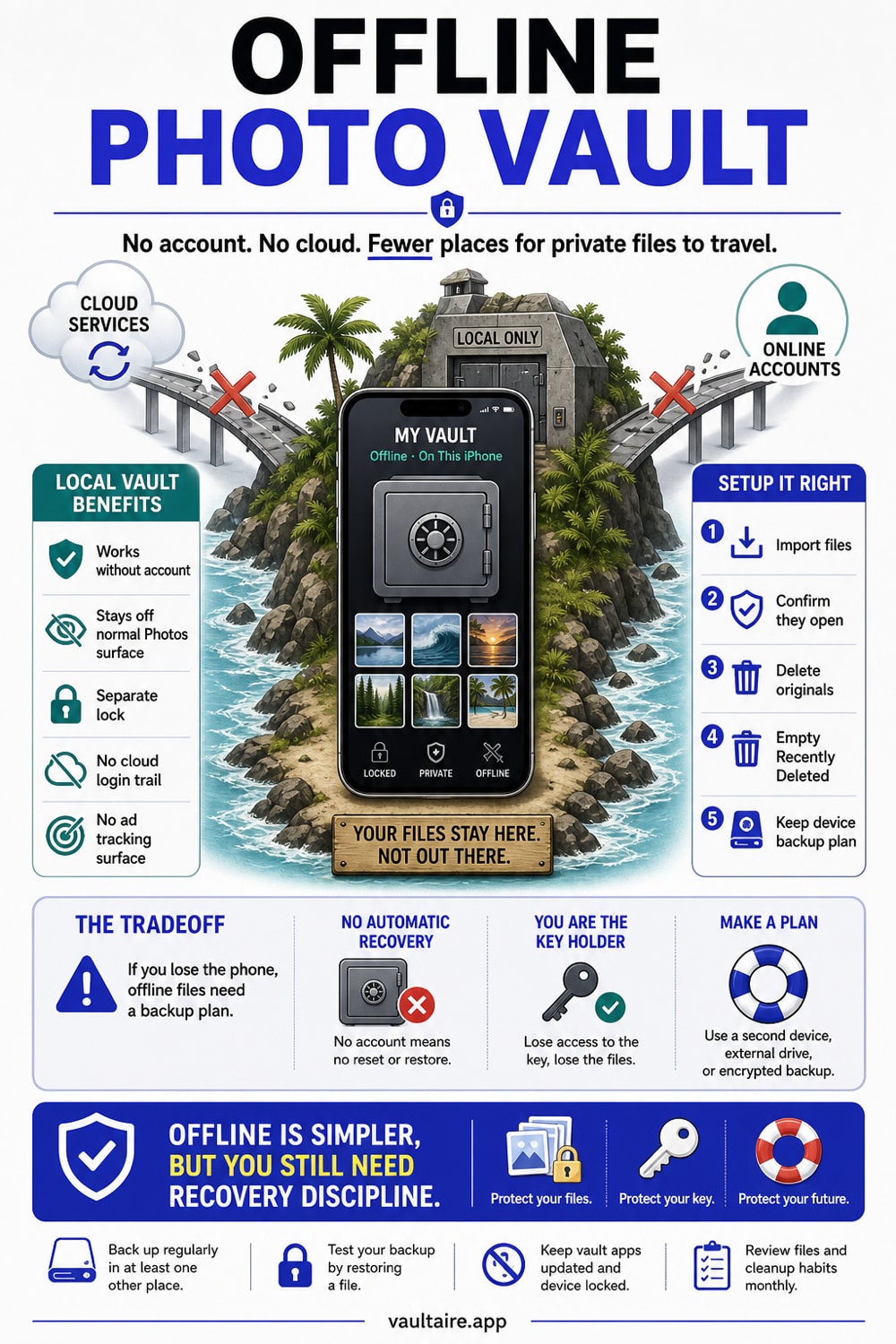
An offline photo vault stores private photos locally on your iPhone, encrypts them on the device, and does not need an identity account or app-managed upload. That removes the vault provider's account and content server from normal local use. It does not automatically stop iCloud Backup or a Finder/iTunes device backup from copying encrypted app data. To set one up, check both iCloud Photos and device-backup settings, pick a vault that works in Airplane Mode with no sign-in, move your photos in, give the vault its own credential, then delete the originals and empty Recently Deleted.
Why offline and no account actually matter
Most photo apps assume you want your pictures everywhere. They sync to the cloud, copy across every device on your account, and tuck a backup somewhere you never look. That is convenient for vacation photos and terrible for private ones. The moment a photo leaves your phone, you lose track of where the copies live and who can reach them.
An offline vault removes the need for its own identity account, password-reset email, or developer content server holding the files. The remaining boundary still includes the app, iOS, Keychain, the unlocked device, app analytics and crash diagnostics unless you turn them off in Settings, and any system backup that copies the app container. The privacy gain is narrower and more useful than an absolute claim: fewer remote systems receive vault data during ordinary local use.
Why the Hidden album and cloud lockers fall short
The iPhone Hidden album feels like a vault but is not a separately encrypted container. Its photos remain in the Photos library, follow that library's iCloud and backup settings, and can fall back to the device passcode when biometric authentication is unavailable. Apple still applies device and iCloud data protection, but the Hidden album does not create a distinct content key or credential outside the phone's access model.
Cloud-based vault apps add a remote storage and account boundary. Depending on their design, the provider may hold readable content keys, or it may receive only client-side encrypted records while still retaining account and service metadata. A local offline vault removes that app-managed cloud path. To keep its encrypted files on one device only, you must also prevent system device backups from copying the app container.
What to look for in a local vault
Test it in Airplane Mode. Turn off Wi-Fi and cellular, then add and open a photo. If everything still works, the vault is genuinely local. If it stalls or asks you to sign in, it depends on a server. A true offline vault never needs a network to store or show your photos.
Then check three things: that it encrypts files on the device rather than just hiding them, that it uses a credential separate from your phone passcode, and that it asks for no email or identity account. Vaultaire encrypts each photo with AES-256-GCM under a random master key and opens with its own drawn pattern. Local vault use works without a network connection. App analytics and crash diagnostics are enabled by default and can be turned off with “Share errors anonymously” in Settings. Its encrypted iCloud backup is on by default; turn it off in Settings to keep the vault on this device only. Sync and sharing are optional. All three use client-side encrypted CloudKit records.
Setting it up the right way
Order matters. Before you move anything, decide what to do about iCloud Photos, because a photo that already synced has copies elsewhere. Turning sync off stops new copies, but it does not recall the ones already out there, so treat anything previously synced as already exposed and plan accordingly.
Once the vault holds your photos and you have confirmed they open offline, finish the job by clearing the trail. Delete the originals from Photos, which Vaultaire offers to do after the import, then empty Recently Deleted, where deleted photos linger for 30 days. Skip that last step and the originals stay one tap away for anyone who picks up your phone, which defeats the whole point of moving them.
Related guides
Sources
- Apple Support: Keep your photos and videos in iCloud Photos
- Apple Support: Hide photos on your iPhone, iPad, and Mac
- Apple Support: Recover deleted photos and videos
Frequently Asked Questions
What is an offline photo vault?
It is an app that stores private photos directly on your iPhone, encrypts them on the device, and works without an identity account or internet connection. It does not need an app-managed upload, but iCloud Backup or a computer backup may still copy its local data unless that path is excluded or disabled.
Do I really not need an account?
With a true offline vault, no. It should open with a credential set on the device and work without an email or sign-in. An account requirement adds a remote identity service, although it does not by itself prove that the provider uploads readable vault files.
Is an offline vault safer than iCloud or a cloud vault?
It removes the vault provider's account and storage service from the normal local workflow, which reduces remote attack surface. It is not automatically safer against device access, weak credentials, implementation flaws, or system backups, and it sacrifices off-device recovery unless you create a protected backup.
Will my photos sync or back up to iCloud from the vault?
An offline vault can stay out of iCloud Photos and avoid its own cloud sync. That does not automatically exclude the app container from iCloud Backup or a Finder/iTunes device backup. Vaultaire's own CloudKit backup is on by default and can be turned off in Settings, while system device backups remain a separate copy path.
What happens to my vault photos if I lose my phone?
If no app-managed or system backup contains the vault, losing the phone loses the only copy. A device backup may contain encrypted local vault data, and Vaultaire also makes a client-side encrypted CloudKit backup by default. Keep the recovery material required by whichever path you choose.
How do I move photos in without leaving copies behind?
Import the photos into the vault, confirm they open while offline, then delete the originals from Photos and empty Recently Deleted. That last step matters: deleted photos sit in Recently Deleted for 30 days, so until you clear it the originals are still on the phone.