Is There a Hidden Backup on iPhone? Where Hidden Photos Go
Plenty of people have gone looking for a feature called hidden backup and found nothing like it anywhere in Settings. No such item exists. When you hide a photo, the photo itself stays in the same photo library and simply picks up a marker. So once the question turns to backups, what matters is not whether you hid it, but which system your library is entrusted to, iCloud Photos or the iCloud backup. This guide walks through how to tell those apart, and what happens with a backup taken on a computer.
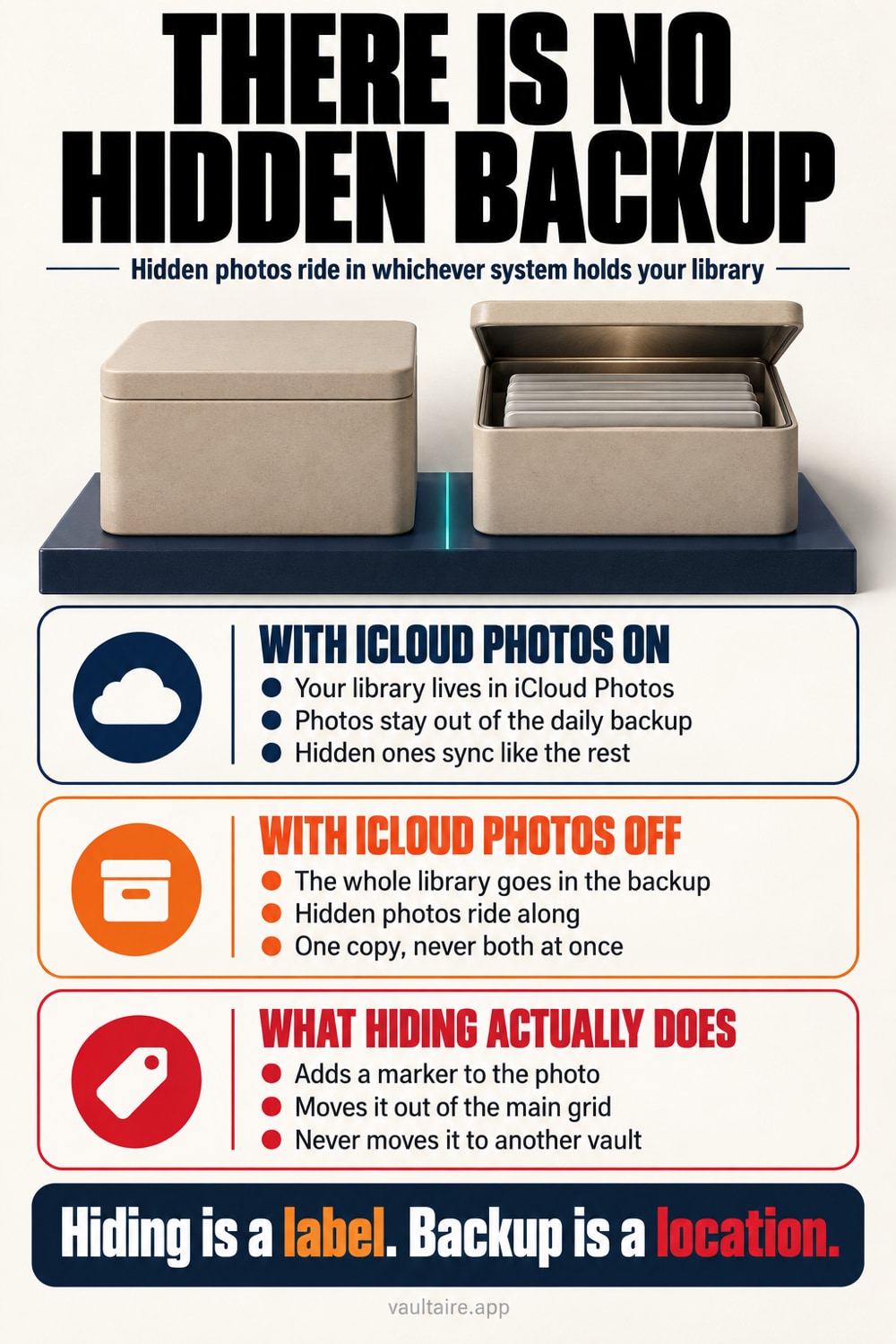
There is no hidden backup feature on iPhone. Hiding a photo does not move it anywhere. It adds a hidden marker to one photo inside your photo library. The file does not move. So the photos in the Hidden album are backed up along with the library. Which of the two holds them is settled by Apple's rule, and it is only ever one. Open the Settings app, tap your name, then iCloud, then Photos. If Sync this iPhone is on, your photos are on the iCloud Photos side and are not included in the daily iCloud backup. If it is off, your photo library becomes the contents of the iCloud backup as it is. To confirm, open the Settings app, tap your name, then iCloud, then Manage Account Storage, then Backups, select your device, and see whether a Photo Library row is there. A backup taken on a computer is a separate matter. A backup made in Finder or the Apple Devices app is not encrypted unless you tick Encrypt local backup. The Face ID lock on the Hidden album is a lock on a screen in the Photos app, so it does not follow the photos into the backup.
There is no hidden backup feature
Neither the Settings app nor the Photos app has an item called hidden backup. The phrase is one people invented themselves while trying to work out how their hidden photos are stored. What actually happens is simpler. When you hide a photo, that photo picks up a single hidden marker, drops out of the normal grid, and is gathered into the Hidden album inside Utilities. Open the Photos app and scroll down from Collections at the bottom of the screen to reach that heading.
Because it is only a marker, the file has not moved a step out of your photo library. It is not encrypted, and it is not shifted to some other storage place. This is the part that matters, because the machinery that makes backups deals with the library as a whole. If the library is carried out, the contents of the Hidden album are carried out with it. So the question to ask is not whether hidden photos are backed up, but which system your library is entrusted to right now.
It is either iCloud Photos or the iCloud backup, only one of them
Apple's rule is that the same photo is never held twice. If iCloud Photos is on, your photos and videos sync on the iCloud Photos side and are not included in the daily iCloud backup. If it is off, your photo library becomes the contents of the iCloud backup as it is. In neither case is the Hidden album treated as an exception. To check, open the Settings app, tap your name, then iCloud, then Photos, and see whether Sync this iPhone is on or off.
If you want it clearer still, look at the breakdown. In the Settings app, open your name, iCloud, Manage Account Storage, then Backups, and select the iPhone you use, and what goes into the backup is listed row by row. If there is a Photo Library row, the Hidden album is in there too. If the row is missing, your photos are on the iCloud Photos side. How hidden photos sync when you turn iCloud Photos on is covered in a separate guide. For the full list of what else rides along in an iPhone backup, including copies of old phones, see what is in an iPhone backup and where to find it.
A backup taken on a computer has no lock on it
When you back up your iPhone in Finder on a Mac, or in the Apple Devices app on Windows, your photo library is placed on that computer's disk. By default this backup is not encrypted. The contents are locked only when you tick Encrypt local backup and set a password. If the tick is left off, anyone who can open the user account on that computer can read the library out of the place the backup is kept.
That includes the photos in the Hidden album. The Face ID or passcode you are asked for when you open the Hidden album is a lock on a screen in the Photos app, not encryption of the photos themselves. Away from your iPhone's screen it does nothing. If you have ever backed up to a computer you share with family, a computer you sent for repair, or a work computer, treat that one machine as holding a second copy of your Hidden album. Checking how far backup encryption protects you alongside this makes the decision easier.
What a restore leaves you with, and a surer way to hide than a marker
Restore from a backup and the hidden marker comes back as it was. Even on a freshly restored iPhone, the photos you hid do not appear in the normal grid and stay in the Hidden album inside Utilities. That part you can relax about. It holds only when you open them in the Photos app, though. Open the backup files themselves with another tool, and because the marker is no more than a display instruction, the photos line up alongside all the others.
In one line, hiding does not change where a photo is kept, it changes where a photo is seen. Backups deal with files rather than eyes, so a photo you meant to make invisible is carried along as it is. If you have photos or documents you truly want out of other people's sight, do not leave them in your photo library and hide them. Encrypt them on the device, move them somewhere that opens only with a separate key, and delete the originals on the Photos app side. Do that and they will not go into iCloud or a computer backup in any openable form.
Related guides
- Are hidden photos synced to iCloud
- What gets encrypted in an iPhone photo backup
- What happens to hidden photos on a new iPhone
- Who can see your hidden photos on iCloud
References
Frequently asked questions
What is hidden backup?
There is no feature by that name on iPhone. When you hide a photo, it stays in the same photo library, picks up a hidden marker, and is gathered into the Hidden album inside Utilities. No dedicated storage place and no dedicated backup is created for it, so inside a backup it is treated exactly like every other photo.
If iCloud Photos is on, do hidden photos go into the iCloud backup?
No. When iCloud Photos is on, your photos and videos sync on the iCloud Photos side and drop out of the daily iCloud backup. That does not mean they disappear from iCloud. It only means they are entrusted to iCloud Photos rather than to the backup. The Hidden album syncs the same way and opens on your other devices under the same Apple Account.
Can hidden photos be pulled out of a backup taken on a computer?
Yes, if you have not ticked Encrypt local backup. That backup is not encrypted, so anyone who can open the computer can read the library out of the place the backup is kept. The Face ID lock on the Hidden album is a lock on a screen in the Photos app, so it does not follow the photos into the backup. Tick the box and set a password, and it can no longer be read without that password.
After a restore from backup, do the photos stay hidden?
They stay hidden as long as you open them in the Photos app. Restoring brings the marker back too, so the photos you hid do not appear in the normal grid and sit in the Hidden album inside Utilities. The marker is no more than a display instruction, though, so it does nothing when the backup files are opened directly with another tool.